
By default, Joomla articles only display the intro image in category view, either above or below your article title, depending on your template. However, in many cases, you will need to show different types of media or content types, such as video, sound, etc. Fortunately, with the introduction of JSN Sun Framework version 1.3.0, you can now have a variety of content types which can meet any requirements of your blogging or article writing needs.
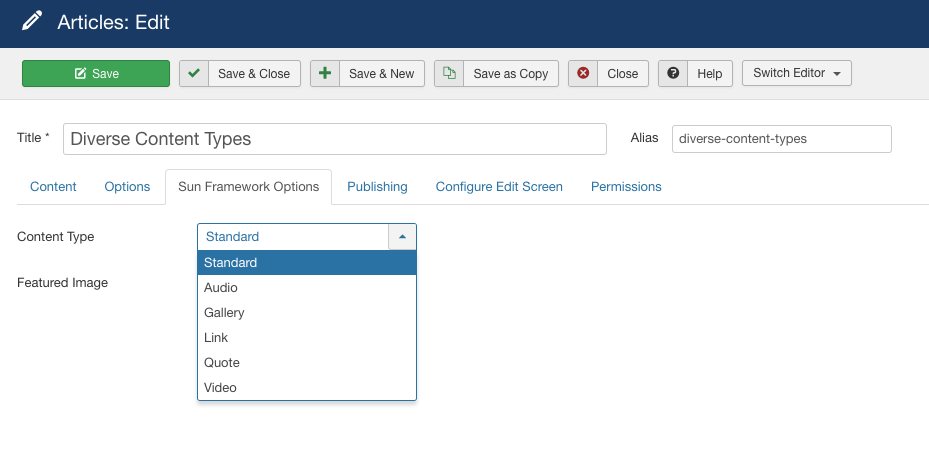
To use our special content types, when creating or editing an article, go to Sun Framework Options to select a content type that you want.
New Drag-n-Drop Layout Builder
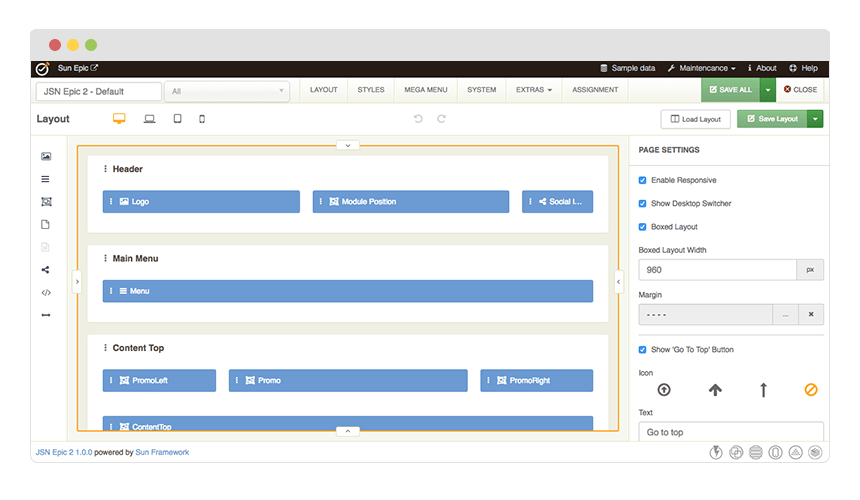
The good new is, with the new Sun Framework, you can freely modify any layout element in JSN EduCare to any degree with complete design control. This framework helps you go beyond any limit that you might experience with the first JSN EduCare template or any other Joomla templates in the market.
Unlimited Module Positions
Just with drag-n-drop in the Layout Builder, you can create Joomla module position on the fly without having to write a single line of code. Thanks to the power of Sun Framework, JSN EduCare provides UNLIMITED module positions in addition to the pre-built ones.
Layout Variations
JSN EduCare layout system is flexible and capable than ever before. The built-in module positions are designed in smart way to cover all possible spot where you might want to put content. However, please do not be confused by them or think that they are all the variations that you can have. They are are just some examples that we create to help you speed up your site development process. You can create your own layout variation in any style you want. Bellow is live presentation of some most popular layout variations:


Nowadays, social media is very popular with every website. The consumers can interact with the companies better via social media. Not only for businesses but also for individuals, it's essential to show your social activities to visitors. Thus, we have integrated the social icons in template.

Display your social channels without confusion
In Sun Framework powered templates, you are free to integrate your social channels without digging into the code. Just drag the the social icons item into the Layout Builder, fill in their URLs, name and adjust their styles. You can drag the social icon item to any position in your template. There are 11 icons that cover most of major social media services and application.
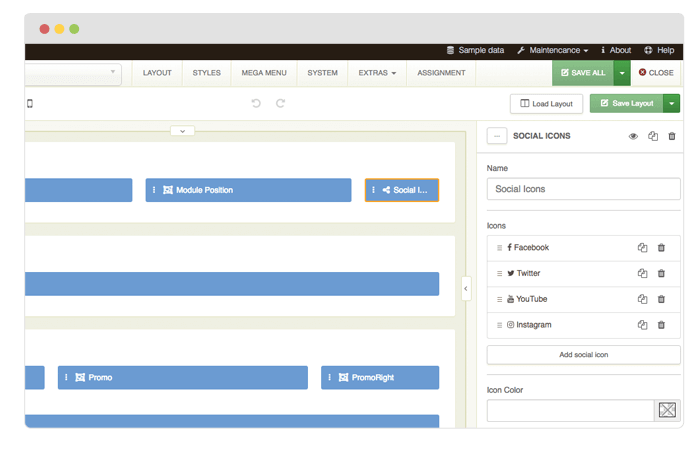
Bulit-in social icons support in templates powered by Sun Framework
The slider you see on this website is the Free Edition of another cool product JSN EasySlider from JoomlaShine. Please click on the below button to check the PRO Edition of this extension.
Have you ever been frustrated when digesting content presented boringly on the web? Have you ever thought that ... perhaps, your website visitors are suffering from those same negative feeling?
In order to give your content an effective presentation on the web, we developed JSN EasySlider on the “Three-I” criteria of information conveyance:
- I-mpressive: Stunning effects and transitions to grab and maintain audience attention.
- I-nformative: Dynamic content (text, video and images) are synthesized to deliver information.
- I-nteractive: Call-to-actions are easy to insert attractively to ensure content engagement.
Besides superpower for content presentation, it also has a uniquely outstanding feature:extremely user-friendly interface. With Drag-n-drop functionality, WYSIWYG Editor, Timeline editor and live preview, no lines of code are required to get a stunning slider.
You will be certainly captivated!
Below is the stunning slider created by the Free Edition of JSN EasySlider.
At JoomlaShine.com, we put great efforts in optimizing our templates performance by multiple techniques like image sprites application, clean html code output and now one new step CSS/JS Compression.
What it does is to combine all CSS/JS files into a single file and deliver it in GZIP compressed state to browser. This feature significantly reduce http request number to server as well as overall loading size, which results in 35% performance boost.

Before enabling CSS/JS compression

After enabling CSS/JS compression
CSS/JS Compression feature is enabled on this demo website. You can check the source code to see how it works.
Custom CSS File(s)
This feature allows you to load multiple custom CSS files among with template default files. This feature is very useful, when you have special dedicated CSS file for content styling.

Custom CSS files are loaded among with other template CSS files
Just put custom CSS files to template's CSS folder and define them in template parameter Custom CSS File(s) each file name at a line. If you enable CSS/JS Compression feature, all custom CSS files will be compressed as well.